這一篇在講什麼
AI Perception 是 UE5 AI 的感官入口。這一篇先把 AIPerception 與 Stimuli Source 的組件關係講清楚,再分別整理各種 Sense 的配置項與判定方式。
感知系統 AI Perception
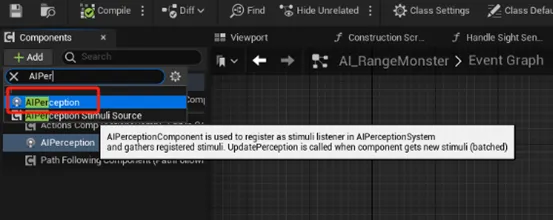
- 使用的AI Controller -> Add Component
- AIPerception => 刺激源接收器
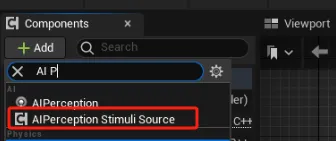
- AIPerception Stimuli Source => 刺激源發生器
- 在非AI Actor上添加並注冊對應事件,從而被AI所「感知」到
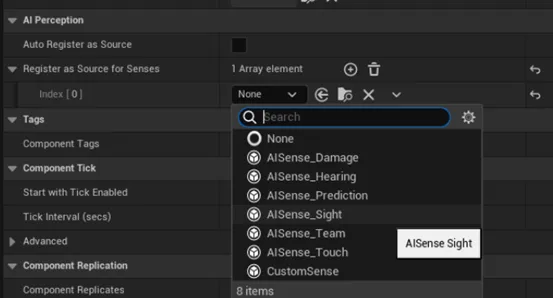
- 增加具體要被哪些感官所能感知到
- 所有Pawn都會默認加上Sight,所以多用於添加其他類型的刺激或者非Pawn的Actor也能發生刺激的場景上
- 在非AI Actor上添加並注冊對應事件,從而被AI所「感知」到
AI Perception 使用與參數說明
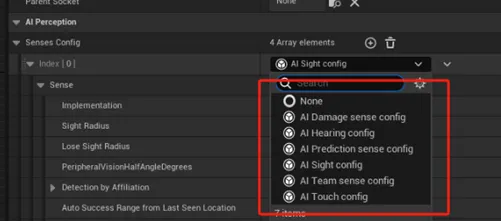
- 在AI Perception組件中,可以配置相應的Sense Config項
Sight 視覺感知
- Detection by Affiliation 決定誰能觸發事件(敵人/路人/友軍)
- Affiliation目前只能在C++裡定義
- 在blueprint裡可以勾上Dectect Neutrals(路人)來檢測所有Actor
- Auto Success Range from Last Seen Location 對象必然會被重新看見的距離
- if value > 0,對象如果離上次被看見的距離 < value,則仍然算是被看見
- if value < 0,每次失蹤後都要重新做一次完整的視覺感知
- 例子:解決恐怖遊戲的當面入櫃情況
- 具體視野計算
- Sight Radius / Lose Sight Radius 視野/ 失蹤距離,會被轉化成Square值
//AISense_Sight.cpp
UAISense_Sight::FDigestedSightProperties::FDigestedSightProperties(const UAISenseConfig_Sight& SenseConfig)
{
    SightRadiusSq = FMath::Square(SenseConfig.SightRadius + SenseConfig.PointOfViewBackwardOffset);
    LoseSightRadiusSq = FMath::Square(SenseConfig.LoseSightRadius + SenseConfig.PointOfViewBackwardOffset);
}-
- Peripheral Vision Half Angle Degrees 可視範圍的半角,會被轉成弧度加入計算
- Point of View Backward Offset 如果不接近於0,就會用來調整視野的起點位置
- == 0:起點位置 = AI自身的位置
- != 0:起點位置 = 正後方方向normalized * Point of View Backward Offset
- Near clipping Radius:從新起點計算的近平面半徑,會被轉化為Square值
- Point of View Backward Offset 如果不接近於0,就會用來調整視野的起點位置
- Peripheral Vision Half Angle Degrees 可視範圍的半角,會被轉成弧度加入計算
//AISense_Sight.cpp
UAISense_Sight::FDigestedSightProperties::FDigestedSightProperties(const UAISenseConfig_Sight& SenseConfig)
{
    NearClippingRadiusSq = FMath::Square(SenseConfig.NearClippingRadius);
}-
- 具體視野示意圖如下(視野檢測會調用CheckIsTargetInSightCone):
//AIHelpers.cpp
//----------------------------------------------------------------------//
// CheckIsTargetInSightCone
//                     F
//                   *****
//              *             *
//          *                     *
//       *                           *
//     *                               *
//   *                                   *
//                                     /
//                                    /
//                                   /
//                    X             /
//                                 /
//                   ***          /
//               *    N    *     /
//            *               * /
//            N                 N
//
//
//
//
//
//
//                     B
//
// X = StartLocation
// B = Backward offset
// N = Near Clipping Radius (from the StartLocation adjusted by Backward offset)
// F = Far Clipping Radius (from the StartLocation adjusted by Backward offset)
//----------------------------------------------------------------------//
bool CheckIsTargetInSightCone(const FVector& StartLocation, const FVector& ConeDirectionNormal, float PeripheralVisionAngleCos,
    float ConeDirectionBackwardOffset, float NearClippingRadiusSq, float const FarClippingRadiusSq, const FVector& TargetLocation)
{
    const FVector BaseLocation = FMath::IsNearlyZero(ConeDirectionBackwardOffset) ? StartLocation : StartLocation - ConeDirectionNormal * ConeDirectionBackwardOffset;
    const FVector ActorToTarget = TargetLocation - BaseLocation;
    const FVector::FReal DistToTargetSq = ActorToTarget.SizeSquared();
    if (DistToTargetSq <= FarClippingRadiusSq && DistToTargetSq >= NearClippingRadiusSq)
    {
        // Will return true if squared distance to Target is smaller than SMALL_NUMBER
        if (DistToTargetSq < SMALL_NUMBER)
        {
            return true;
        }
        // Calculate the normal here instead of calling GetUnsafeNormal as we already have the DistToTargetSq (optim)
        const FVector DirectionToTargetNormal = ActorToTarget * FMath::InvSqrt(DistToTargetSq);
        return FVector::DotProduct(DirectionToTargetNormal, ConeDirectionNormal) > PeripheralVisionAngleCos;
    }
    return false;
}
//AISense_Sight.cpp
UAISense_Sight::EVisibilityResult UAISense_Sight::ComputeVisibility(UWorld* World, FAISightQuery& SightQuery, FPerceptionListener& Listener, const AActor* ListenerActor, FAISightTarget& Target, AActor* TargetActor, const FDigestedSightProperties& PropDigest, float& OutStimulusStrength, FVector& OutSeenLocation, int32& OutNumberOfLoSChecksPerformed, int32& OutNumberOfAsyncLosCheckRequested) const
{
    //...
    const FVector TargetLocation = TargetActor->GetActorLocation();
    const float SightRadiusSq = SightQuery.GetLastResult() ? PropDigest.LoseSightRadiusSq : PropDigest.SightRadiusSq;
    if (!FAISystem::CheckIsTargetInSightCone(Listener.CachedLocation, Listener.CachedDirection, PropDigest.PeripheralVisionAngleCos, PropDigest.PointOfViewBackwardOffset, PropDigest.NearClippingRadiusSq, SightRadiusSq, TargetLocation))
    {
        return EVisibilityResult::NotVisible;
    }
    //...
}
Hearing 聽覺感知
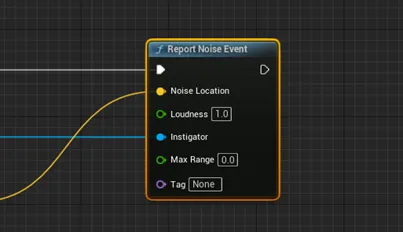
- 響應Report Noise Event
- blueprint裡可以拖出相關節點
-
- Hearing Range 聽覺距離
- Detection by Affiliation 決定誰能觸發事件(敵人/路人/友軍)
- Affiliation目前只能在C++裡定義
- 在blueprint裡可以勾上Dectect Neutrals(路人)來檢測所有Actor
- Detection by Affiliation 決定誰能觸發事件(敵人/路人/友軍)
- Hearing Range 聽覺距離
Touch 接觸感知
- 應在被甚麼碰到/碰到甚麼時觸發
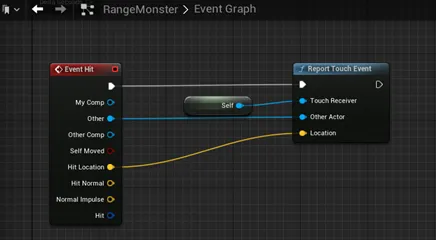
- 響應Report Touch Event
- blueprint裡可以拖出相關節點
Team Sense 隊友感知
- 同陣營接近的時候會通知
- 需要配合C++食用
AI Prediction Sense 預測感知
- 目的是為了讓AI發現玩家後,在跟蹤的過程中跟丟之後,依然會對玩家的可能移動結果進行一個以時間為單位的推算,並得出一個新的目標位置
- 需要配合其他Sense使用,如以下視野檢測:
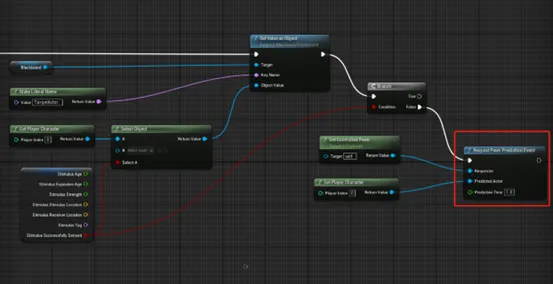
- 當Stimulus Successfully Sensed為false時(看不見了),接入Request Pawn/Character Prediction Event節點,請求做一次Prediction Sense
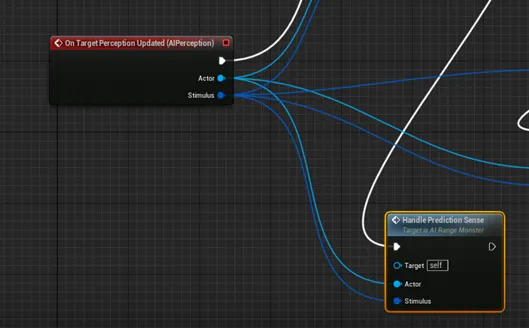
- 然後會觸發Perception Update事件,再在該事件裡增加對Prediction Sense的處理
Damage Sense 傷害感知
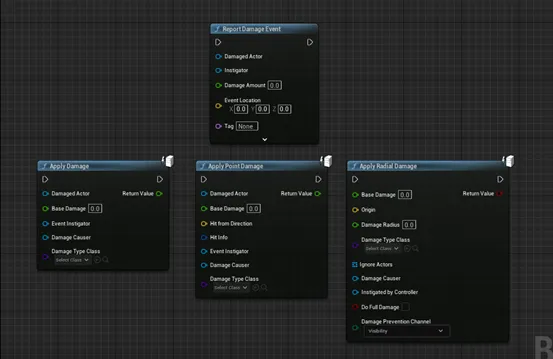
- 響應 Report Damage Event / Apply Any Damage / Apply Radial Damage / Apply Point Damage
- blueprint裡可以拖出相關節點
共同參數
- Dominant Sense => 最優先感知,應該是已配置的感知其中之一
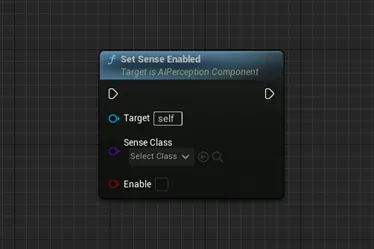
- StartsEnabled:該感知是否要手動啟動,true為不需要
- 手動啟動流程:調用SetSenseEnabled,指定具體的Sense Class
- MaxAge:感知持續時間,0代表永久持續
- 單位是秒
- Age會每幀按一定的增長率遞增,一旦 Age >= MaxAge(ExpirationAge),感知就會「過期」
- 增長率可以在UAIPerceptionSystem的初始化列表裡修改
//AIPerceptionSystem
UAIPerceptionSystem::UAIPerceptionSystem(const FObjectInitializer& ObjectInitializer)
    : Super(ObjectInitializer)
    , PerceptionAgingRate(0.3f)
    , bHandlePawnNotification(false)
    , NextStimuliAgingTick(0.)
    , CurrentTime(0.)
{
    StimuliSourceEndPlayDelegate.BindDynamic(this, &UAIPerceptionSystem::OnPerceptionStimuliSourceEndPlay);
}
void UAIPerceptionSystem::Tick(float DeltaSeconds)
{
    SCOPE_CYCLE_COUNTER(STAT_AI_PerceptionSys);
    SCOPE_CYCLE_COUNTER(STAT_AI_Overall);
    CSV_SCOPED_TIMING_STAT_EXCLUSIVE(AIPerception);
    // if no new stimuli
    // and it's not time to remove stimuli from "know events"
    UWorld* World = GEngine->GetWorldFromContextObjectChecked(GetOuter());
    check(World);
    if (World->bPlayersOnly == false)
    {
        // cache it
        CurrentTime = World->GetTimeSeconds();
        if (SourcesToRegister.Num() > 0)
        {
            PerformSourceRegistration();
        }
        bool bSomeListenersNeedUpdateDueToStimuliAging = false;
        if (NextStimuliAgingTick <= CurrentTime)
        {
            constexpr double Precision = 1./64.;
            const float AgingDt = FloatCastChecked<float>(CurrentTime - NextStimuliAgingTick, Precision);
            bSomeListenersNeedUpdateDueToStimuliAging = AgeStimuli(PerceptionAgingRate + AgingDt);
            NextStimuliAgingTick = CurrentTime + PerceptionAgingRate;
        }
        //...
    }
}
bool UAIPerceptionSystem::AgeStimuli(const float Amount)
{
    ensure(Amount >= 0.f);
    bool bTagged = false;
    for (AIPerception::FListenerMap::TIterator ListenerIt(ListenerContainer); ListenerIt; ++ListenerIt)
    {
        FPerceptionListener& Listener = ListenerIt->Value;
        if (Listener.Listener.IsValid())
        {
            // AgeStimuli will return true if this listener requires an update after stimuli aging
            if (Listener.Listener->AgeStimuli(Amount))
            {
                Listener.MarkForStimulusProcessing();
                bTagged = true;
            }
        }
    }
    return bTagged;
}
//AIPerceptionComponent.cpp
bool UAIPerceptionComponent::AgeStimuli(const float ConstPerceptionAgingRate)
{
    bool bExpiredStimuli = false;
    for (FActorPerceptionContainer::TIterator It(PerceptualData); It; ++It)
    {
        FActorPerceptionInfo& ActorPerceptionInfo = It->Value;
        for (FAIStimulus& Stimulus : ActorPerceptionInfo.LastSensedStimuli)
        {
            // Age the stimulus. If it is active but has just expired, mark it as such
            if (Stimulus.AgeStimulus(ConstPerceptionAgingRate) == false
                && (Stimulus.IsActive() || Stimulus.WantsToNotifyOnlyOnPerceptionChange())
                && Stimulus.IsExpired() == false)
            {
                AActor* TargetActor = ActorPerceptionInfo.Target.Get();
                if (TargetActor)
                {
                    Stimulus.MarkExpired();
                    RegisterStimulus(TargetActor, Stimulus);
                    bExpiredStimuli = true;
                }
            }
        }
    }
    return bExpiredStimuli;
}
//AIPerceptionTypes.h
/** @return false when this stimulus is no longer valid, when it is Expired */
FORCEINLINE bool AgeStimulus(float ConstPerceptionAgingRate)
{
    Age += ConstPerceptionAgingRate;
    return Age < ExpirationAge;
}