這一篇在講什麼
這一篇先把 UE5 行為樹的起點整理清楚,重點不是複雜邏輯,而是把 AI Controller、角色自動接管、Blackboard 與 Behavior Tree 資源之間的關係先串起來。
參考資料
這幾條資料對理解 UE5 AI 的基礎流程很有幫助:
- Artificial Intelligence in Unreal Engine 5.3 https://dev.epicgames.com/documentation/en-us/unreal-engine/artificial-intelligence-in-unreal-engine
- Unreal Engine 5 Tutorial - AI https://www.youtube.com/watch?v=IDZh0epFTRY&list=PL4G2bSPE_8uklDwraUCMKHRk2ZiW29R6e&index=2
- UE4源码-AI感知系统AIPerception https://zhuanlan.zhihu.com/p/569297977
- ue4 自定义行为树的Service, Task,Decorator节点 https://blog.csdn.net/u010385624/article/details/89339958
- Navigation Modifiers and Links in UE4 https://www.vikram.codes/blog/ai/02-nav-modifiers-links
- UE的AI基础(2)EQS https://blog.csdn.net/qq_45617648/article/details/130938339
- UE4场景询问系统浅析(EQS与行为树) https://www.uejoy.com/?p=500
行為樹建立
事前準備
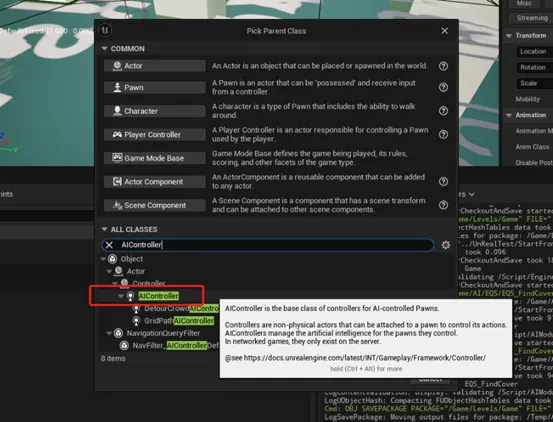
- 創建繼承了AI Controller父類的藍圖
- 創建AI角色(Character)
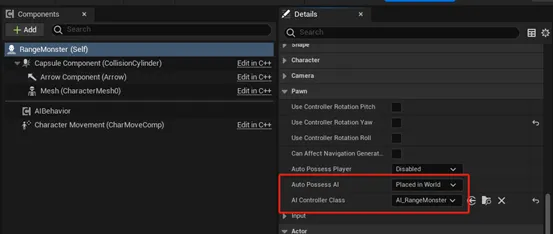
- 在Character -> Pawn設置中進行AI Controller Class和 Auto Possess AI的配置
- 參數說明
- AI Controller Class -> 這個角色對應的繼承了AI Controller父類的藍圖
- Auto Possess AI -> 指的是AI Controller Class要怎樣接管Character(AI Controller接管了Character才能使AI生效)
- Placed in World:一開始就放在場景的Character會被自動接管
- 如果Character後面被卸載了,再重新生成出來,就不會再被AI Controller Class接管
- Spawned:場景加載完之後,再被生成出來的Character會被自動接管,也就是說一開始就放置在場景裡的Character不會被AI Controller Class接管
- Placed in World or Spawned:只要Character被創建出來就自動接管
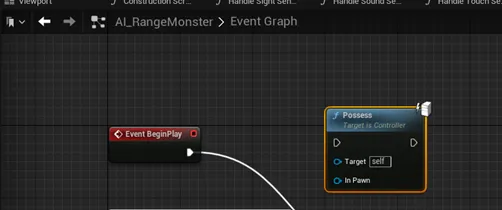
- Disable -> 不自動接管,需要在AI Controller裡手動接管
- AI Controller裡使用Possess節點(Server Only),接受一個接管對象參數
- Placed in World:一開始就放在場景的Character會被自動接管
//Pawn.cpp
void APawn::PostInitializeComponents()
{
    QUICK_SCOPE_CYCLE_COUNTER(STAT_Pawn_PostInitComponents);
    Super::PostInitializeComponents();
    if (IsValid(this))
    {
        UWorld* World = GetWorld();
        // Automatically add Controller to AI Pawns if we are allowed to.
        if (AutoPossessPlayer == EAutoReceiveInput::Disabled
            && AutoPossessAI != EAutoPossessAI::Disabled && Controller == nullptr && GetNetMode() != NM_Client
#if WITH_EDITOR
            && (GIsEditor == false || World->IsGameWorld())
#endif // WITH_EDITOR
            )
        {
            const bool bPlacedInWorld = (World->bStartup);
            if ((AutoPossessAI == EAutoPossessAI::PlacedInWorldOrSpawned) ||
                (AutoPossessAI == EAutoPossessAI::PlacedInWorld && bPlacedInWorld) ||
                (AutoPossessAI == EAutoPossessAI::Spawned && !bPlacedInWorld))
            {
                SpawnDefaultController();
            }
        }
        // update movement component's nav agent values
        UpdateNavAgent();
    }
}
void APawn::SpawnDefaultController()
{
    if ( Controller != nullptr || GetNetMode() == NM_Client)
    {
        return;
    }
    if (AIControllerClass != nullptr)
    {
        FActorSpawnParameters SpawnInfo;
        SpawnInfo.Instigator = GetInstigator();
        SpawnInfo.SpawnCollisionHandlingOverride = ESpawnActorCollisionHandlingMethod::AlwaysSpawn;
        SpawnInfo.OverrideLevel = GetLevel();
        SpawnInfo.ObjectFlags |= RF_Transient;    // We never want to save AI controllers into a map
        AController* NewController = GetWorld()->SpawnActor<AController>(AIControllerClass, GetActorLocation(), GetActorRotation(), SpawnInfo);
        if (NewController != nullptr)
        {
            // if successful will result in setting this->Controller
            // as part of possession mechanics
            NewController->Possess(this);
        }
    }
}
資源建立與配置
-
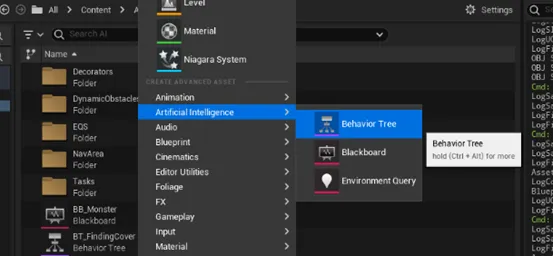
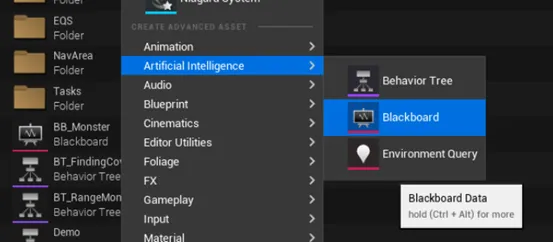
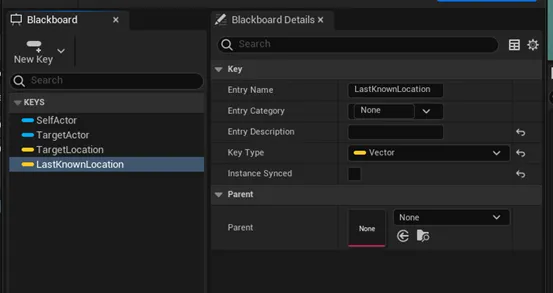
創建Blackboard資源
- 用於管理行為樹(s)可用的變量Key,使行為樹可以追蹤、控制AI Agent的狀態
-
創建行為樹
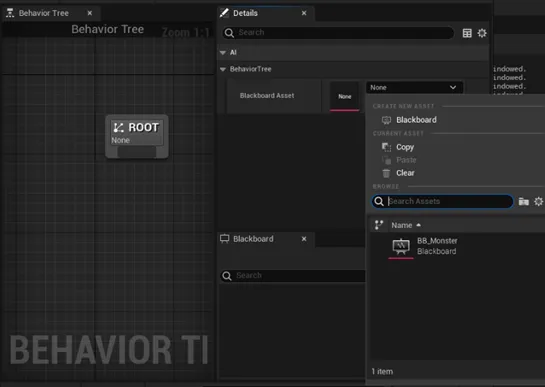
- 在樹界面有一個根節點,也是行為樹運行的起點
- Detail界面要求指定一個Blackboard資源
- 使這個行為樹能基於該Blackboard的Key狀態執行不同的行為