這一篇在講什麼
當 Composite 與 Decorator 決定了流程,真正讓 AI 動起來的就是 Service 和 Task。這一篇分別整理兩者的用途、藍圖入口,以及整棵行為樹是如何被啟動的。
行為樹 Service 節點
- 用於取代Parallel節點的方案,可以添加在Task節點或者Decorator節點上,並可以通過指定Interval和Random Deviation來控制調用的頻率
- 右鍵節點 -> Add Service
內建 Service
- Default Focus 使AI Controller可以快速訪問到指定的Actor,而不用通過Blackboard Key獲取
- Run EQSQuery 執行EQS查詢,把查詢結果保存到Blackbboard Key中
自定義 Service
- 行為樹上方工具列 -> New Service
- Service藍圖自帶4式8種Function可供重載。且帶AI後綴的才能拿到AI Controller,否則只能拿到Actor
- Receive Activation(AI):父節點激活時觸發
- Receive Search Start(AI):自身所在節點激活時觸發
- Receive Tick(AI):節點執行中每幀觸發
- Receive Deactivation(AI):父節點結束時觸發
行為樹 Task 節點
- 行為樹具體要執行的行為
- 右鍵節點 -> Add Task
內建 Task
- Finish With Result:直接返回某個結果(Succeeded/Failed/Aborted/InProgress)
- Make Noise:如果Pawn上有PawnNoiseEmitter,該Task就會對實現了AIHearing監聽的對象發送消息,通知他們「聽到了」Pawn發出的Noise
//BTTask_MakeNoise.cpp
EBTNodeResult::Type UBTTask_MakeNoise::ExecuteTask(UBehaviorTreeComponent& OwnerComp, uint8* NodeMemory)
{
    const AController* MyController = Cast<AController>(OwnerComp.GetOwner());
    APawn* MyPawn = MyController ? MyController->GetPawn() : NULL;
    if (MyPawn)
    {
        MyPawn->MakeNoise(Loudnes, MyPawn);
        return EBTNodeResult::Succeeded;
    }
    return EBTNodeResult::Failed;
}
//Actor.cpp
void AActor::MakeNoise(float Loudness, APawn* NoiseInstigator, FVector NoiseLocation, float MaxRange, FName Tag)
{
    NoiseInstigator = NoiseInstigator ? NoiseInstigator : GetInstigator();
    if ((GetNetMode() != NM_Client) && NoiseInstigator)
    {
        AActor::MakeNoiseDelegate.Execute(this, Loudness, NoiseInstigator
            , NoiseLocation.IsZero() ? GetActorLocation() : NoiseLocation
            , MaxRange
            , Tag);
    }
}
void AActor::SetMakeNoiseDelegate(const FMakeNoiseDelegate& NewDelegate)
{
    if (NewDelegate.IsBound())
    {
        MakeNoiseDelegate = NewDelegate;
    }
}
//AISense_Hearing.cpp
void UAISense_Hearing::RegisterMakeNoiseDelegate()
{
    AActor::SetMakeNoiseDelegate(FMakeNoiseDelegate::CreateStatic(&UAIPerceptionSystem::MakeNoiseImpl));
}- Move Directly Toward / Move To
- Move Directly Toward:不使用導航系統,使Actor直線移動到目標(位置)
- Move To:使用導航系統,使Actor移動到目標(位置)
- 主要參數:
- Acceptable Radius:距離目標於該半徑內時節點返回Succeeed
- Reach Test Includes Agent Radius AI角色的Capsule半徑是否要加入計算考慮
- Reach Test Includes Goal Radius 終點的Capsule半徑是否要加入計算考慮
- Allow Strafe:移動期間是否要注視著目標
- Allow Partial Path 如果目標無法到達,也會走一條不完整的路線
- Track Moving Goal 會追蹤一直移動的目標
- Require Navigable End Location 需保證終點是可被導航達到的
- Observe Blackboard Value 如果目標的Blackboard Key改變了,追蹤的目標也會改變
- Acceptable Radius:距離目標於該半徑內時節點返回Succeeed
//PathFollowingComponent.cpp
FVector UPathFollowingComponent::GetMoveFocus(bool bAllowStrafe) const
{
    FVector MoveFocus = FVector::ZeroVector;
    if (bAllowStrafe && DestinationActor.IsValid())
    {
        MoveFocus = DestinationActor->GetActorLocation();
    }
    else
    {
        const FVector CurrentMoveDirection = GetCurrentDirection();
        MoveFocus = *CurrentDestination + (CurrentMoveDirection * FAIConfig::Navigation::FocalPointDistance);
    }
    return MoveFocus;
}- Play Animation:播放動畫
- Play Sound:播放聲音
- Rotate to Face BBEntry:旋轉面向某Blackboard Actor Key
- Run Behavior:執行子樹(運行時不可變)
- Run Behavior Dynamic:執行子樹(運行時可調用SetDynamicSubtree設置子樹資源)
- Inject Tag:SetDynamicSubtree時用來查找具體要修改哪一個Run Behavior Dynamic任務節點的子樹資源的
- Run EQSQuery:執行EQS查詢,把查詢結果保存到Blackbboard Key中
- Set Tag Cooldown:配合Tag Cooldown Decorator使用,防止行為樹執行
- Wait:等待
- Wait Blackboard Time:等待Blackboard上某個float值
自定義 Task
- 行為樹上方工具列 -> New Task
- Task藍圖自帶3式6種Function可供重載。且帶AI後綴的才能拿到AI Controller,否則只能拿到Actor
- Receive Execute:節點開始執行時觸發
- 執行完畢需要分別調用FinishExecute(Success = true),和FinishExecute(Success = false),否則節點執行會堵塞
- Receive Tick:節點執行中每幀觸發
- Receive Abort:節點結束/打斷時觸發
- 執行完畢需要分別調用FinishAbort(Success = true),和FinishAbort(Success = false),否則節點執行會堵塞
- Receive Execute:節點開始執行時觸發
行為樹啟動與運行
- 在AI角色的AI Controller藍圖中,在適當的時機(如Event Begin Play)裡直接啟動對應的行為樹即可 => Run Behavior Tree, BTAsset = 行為樹資源
- 不過需要注意AI角色配置中的Auto Possess AI不能Disabled,否則就要如上文寫的,需要手動Possess後再啟動
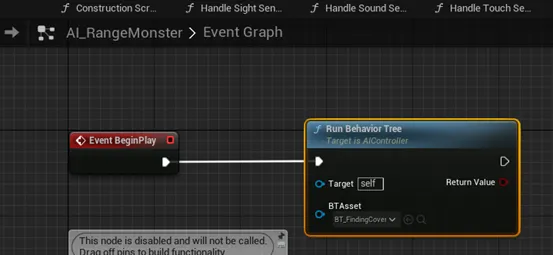
- 執行順序為由上至下,由左往右