《Unityで作るリズムゲーム》學習筆記(七):「判定功能實現」
書名:《Unityで作るリズムゲーム》
作者:長崎大学マルチメディア研究会
判定功能實現
- 在本書中,每個note的評價判定是由一個note的待處理(與判定線重疊)時間以及其被處理(被撃中)時間之間的差的絕對值為標準(單位:秒)
- 判定類型有Perfect、Good、Bad三種
- 具體的判定域幅度如下圖:
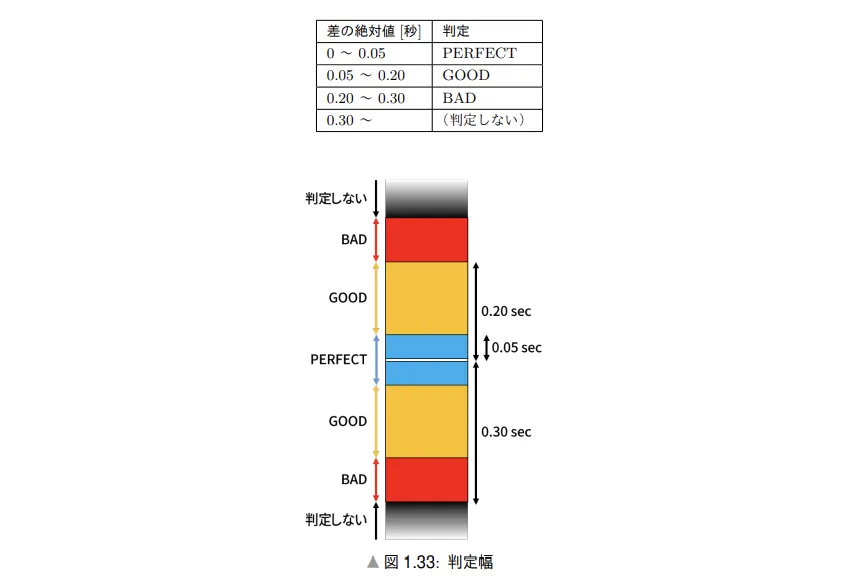
- 需要注意的是,如果判定邏輯單純是當「鍵盤的鍵被按下時,對該鍵對應的軌道上的notes進行判定的話」,當一個軌道上前後有多個notes時,判定範圍裡的所有notes都會做出對該次判定進行回應。
-
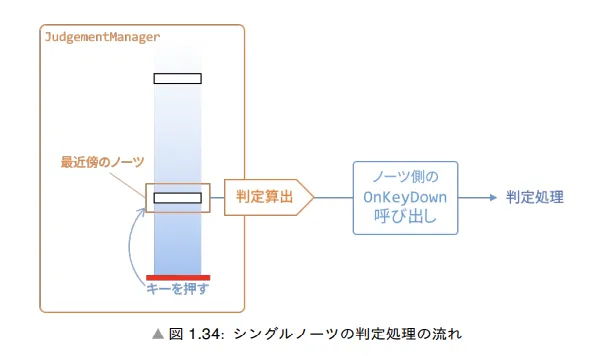
- 因此,實際上一次判定動作要處理的,只有與該鍵對應的軌道中,輸入時間與判定時機間絕對差最小的一個note
Single Note判定
- 判定流程
- 檢測玩家輸入
- 取得輸入對應的軌道上,與判定線最接近的一個note
- 計算判定結果
- 調用note的OnKeyDown函數
- 如果判定成功(!Miss),則執行相應的判定後處理(如刪除note物體)
-
為了增加判定功能,以下的幾個腳本都進行一定程度上的修改
-
NoteProperty
- 為了進行判定,我們需要得到的不是note流動的拍子,而是具體的秒數。因此,在NoteProperty中需要添加secBegin、secEnd來保持note與判定線接觸的時間
- secBegin和secEnd不包含在構造函數中,因為他們是在獲得了速度變化信息和音符beatBegin、beatEnd信息之後才進行設置的。
public class NoteProperty { //... //用於進行note的判定計算 //判定哪個note的判定時間與玩家輸入時間最為接近 public float secBegin; //Note進入判定線,與其重疊的一秒 public float secEnd; //Note離開判定線,離開前與其重疊的最後一拍 }-
BmsLoader
- secBegin和secEnd與note的其他屬性一樣,也需要在BmsLoader中賦值。
-
  public BmsLoader(string filePath)
  {
      //...
      //把不同的速度(BPM)段根據其所發生的具體節拍(beat)從小到大排序
      tempoChanges = tempoChanges.OrderBy(x => x.beat).ToList();

      //完成所有變速和變拍的信息讀取後,就可以得到note實際到達和離開判定線的時間
      foreach (NoteProperty note in noteProperties)
      {
          note.secBegin = BeatMap.BeatToSecWithVarTempo(note.beatBegin, tempoChanges);
          note.secEnd = BeatMap.BeatToSecWithVarTempo(note.beatEnd, tempoChanges);
      }
  }
-
PlayerController
- 判定是對「該軌道上尚沒進行判定後處理的最接近判定線的一個Note」的處理。
- 可以通過一個列表來保存場景中所有沒進行判定後處理的note,進行判定後將其從列表中移除。
-
  //PlayerController
  //...
  //尚未進行判定處理的Note列表
  public static List<NoteControllerBase> existingNotesList;
  //...
  private void Awake()
  {
  //...
  //未判定Notes初始化
  existingNotesList = new List<NoteControllerBase>();
  //...
      //Spawning Notes
      foreach (NoteProperty noteProperty in beatMap.noteDatas)
      {
          //...
          //最開始的時候所有note都還沒被消除,把所有Notes加到未消除note列表中
          existingNotesList.Add(objNote.GetComponent<NoteControllerBase>());
          //...
      }
  }
- 為了進行判定,我們需要得到的不是note流動的拍子,而是具體的秒數。因此,在NoteProperty中需要添加secBegin、secEnd來保持note與判定線接觸的時間
-
-
NoteControllerBase
- 稍後將會創建一個JudgementManager(判定管理器),該管理器會調用Note的OnKeyDown方法(根據判斷結果執行相應的後處理),而具體哪種Note怎麼處理,則由對應的Note自己處理。JudgementManager只負責觸發該方法。
-
  using UnityEngine;

  public abstract class NoteControllerBase : MonoBehaviour
  {
      public NoteProperty noteProperty;
      //Note判定後處理
      public virtual void OnKeyDown(JudgementType judgementType) { }
  }
-
SingleNoteController
- 重載OnKeyDown方法,執行Single Note的判定後處理。主要是在Notes被撃中後或者下落至低於判定線且離開最後的可判定範圍後,把自己的物體以及從PlayerController中的「未消除Notes列表」裡移除
-
  public class SingleNoteController : NoteControllerBase
  {
      private void Update()
      {
          UpdatePosition();
          CheckMiss();
      }

      void CheckMiss()
      {
          //該SingleNote的進入判定線時間小於當前曲目播放時間的幅度超過了壞評價的範圍,Miss
          //同時該判斷確保了只有在判定線以下的note才會被視為miss
          //目前如果玩家在Note還有很久在下落到眼前時進行按鍵輸入,JudgementManager仍然會返回Miss
          //但是由於在OnKeyDown中不處理Miss的Note,因此那些Note才不會被銷毀
          if (noteProperty.secBegin - PlayerController.currentSec
              < -JudgementManager.judgementWidth[JudgementType.BAD])
          {
              //消除Miss了的Note
              PlayerController.existingNotesList.Remove(GetComponent<NoteControllerBase>());
              Destroy(gameObject);
          }
      }

      void UpdatePosition()
      {
          //...
      }

      //該Note被撃中並消除
      public override void OnKeyDown(JudgementType judgementType)
      {
          Debug.Log(judgementType);
          //Bad範圍以內被撃中的Note
          if(judgementType != JudgementType.MISS)
          {
              PlayerController.existingNotesList.Remove(GetComponent<NoteControllerBase>());
              Destroy(gameObject);
          }
      }
  }
-
JudgementManager
-
JudgementManager用來進行Note的判定。通過得到輸入的軌道上最接近判定線的一個note,調用其判斷後處理方法(OnKeyDown)。JudgementManager需要添加到遊戲場景中。
-
JudgementManager主要由以下幾個部分組成
-
定義評價類型和評價的判定範圍
-
  ///
  /// 判定評價
  ///
  public enum JudgementType
  {
      MISS,
      PERFECT,
      GOOD,
      BAD
  }

  public class JudgementManager : MonoBehaviour
  {
      //各評價判定絕對值範圍
      public static Dictionary<JudgementType, float> judgementWidth = new Dictionary<JudgementType, float>
      {
          { JudgementType.PERFECT, 0.05f },
          { JudgementType.GOOD, 0.20f },
          { JudgementType.BAD, 0.30f },
      };
      //...
  }
-
-
遍歷所有軌道和檢測玩家輸入,根據玩家輸入得到對應軌道上的最接近note且進行判定和後處理
-
  public class JudgementManager : MonoBehaviour
  {
      //玩家輸入設置
      static KeyCode[] InputSettings = new KeyCode[]
      {
          KeyCode.D,
          KeyCode.F,
          KeyCode.Space,
          KeyCode.J,
          KeyCode.K,
      };

      private void Update()
      {
          //每幀遍歷所有軌道
          for (int lane = 0; lane < InputSettings.Length; lane++)
          {
              //得到玩家當前輸入的鍵
              KeyCode playerInput = InputSettings[lane];
              //某軌道對應的鍵有輸入時
              if (Input.GetKeyDown(playerInput))
              {
                  //嘗試得到玩家輸入對應軌道上的最接近判定線的note
                  NoteControllerBase nearestNote = GetNearestNote(lane);
                  if (nearestNote == null) { continue; }

                  //得出這個當前時間與該note進入判定線的時間差
                  float noteSec = nearestNote.noteProperty.secBegin;
                  float diffSec = Mathf.Abs(noteSec - PlayerController.currentSec);

                  //得到這個時間差的評價並讓該note進行判定後處理
                  nearestNote.OnKeyDown(GetJudgement(diffSec));
              }
          }
      }
  }
-
-
得到軌道上最接近的note
-
   ///
   /// 得到lane軌道上,與判定線最快接觸的note
   ///
   NoteControllerBase GetNearestNote(int lane)
   {
       //在「未消除note列表」中得到該軌道上的所有note
       var nearNotes =
           PlayerController.existingNotesList
           .Where(note => note.noteProperty.lane == lane);
       //如果該軌道上存在這些note的時候
       if(nearNotes.Any())
       {
           //找出這些note中最快接觸判定線的第一個note並返回
           return nearNotes
               .OrderBy(note =>
                        Mathf.Abs(note.noteProperty.beatBegin - PlayerController.currentBeat))
               .First();
       }
       else
       {
           return null;
       }

   }
-
-
-
評價判斷
-
  ///
  /// 評價判斷
  ///
  JudgementType GetJudgement(float diffSec)
  {
      if(diffSec <= judgementWidth[JudgementType.PERFECT]) { return JudgementType.PERFECT; }
      else if(diffSec <= judgementWidth[JudgementType.GOOD]) { return JudgementType.GOOD; }
      else if(diffSec <= judgementWidth[JudgementType.BAD]) { return JudgementType.BAD; }
      else { return JudgementType.MISS; }
  }
-
-
總體代碼
-
public class JudgementManager : MonoBehaviour { //玩家輸入設置 static KeyCode[] InputSettings = new KeyCode[] { KeyCode.D, KeyCode.F, KeyCode.Space, KeyCode.J, KeyCode.K, }; private void Update() { //每幀遍歷所有軌道 for (int lane = 0; lane < InputSettings.Length; lane++) { //得到玩家當前輸入的鍵 KeyCode playerInput = InputSettings[lane]; //某軌道對應的鍵有輸入時 if (Input.GetKeyDown(playerInput)) { //嘗試得到玩家輸入對應軌道上的最接近判定線的note NoteControllerBase nearestNote = GetNearestNote(lane); if (nearestNote == null) { continue; } //得出這個當前時間與該note進入判定線的時間差 float noteSec = nearestNote.noteProperty.secBegin; float diffSec = Mathf.Abs(noteSec - PlayerController.currentSec); //得到這個時間差的評價並讓該note進行判定後處理 nearestNote.OnKeyDown(GetJudgement(diffSec)); } } } /// /// 得到lane軌道上,與判定線最快接觸的note /// NoteControllerBase GetNearestNote(int lane) { //在「未消除note列表」中得到該軌道上的所有note var nearNotes = PlayerController.existingNotesList .Where(note => note.noteProperty.lane == lane); //如果該軌道上存在這些note的時候 if(nearNotes.Any()) { //找出這些note中最快接觸判定線的第一個note並返回 return nearNotes .OrderBy(note => Mathf.Abs(note.noteProperty.beatBegin - PlayerController.currentBeat)) .First(); } else { return null; } } /// /// 評價判斷 /// JudgementType GetJudgement(float diffSec) { if(diffSec <= judgementWidth[JudgementType.PERFECT]) { return JudgementType.PERFECT; } else if(diffSec <= judgementWidth[JudgementType.GOOD]) { return JudgementType.GOOD; } else if(diffSec <= judgementWidth[JudgementType.BAD]) { return JudgementType.BAD; } else { return JudgementType.MISS; } } } -
要注意的是,玩家在Note還有很久在下落到眼前時進行按鍵輸入,JudgementManager仍然會返回Miss,但是由於在OnKeyDown中不處理Miss的Note,因此那些Note才不會被銷毀 ;而Miss Note只有在低於判定線的Bad判定範圍時間後,才會銷毀自己
-
-
Long Note判定
-
對於Long Note,不同遊戲有不同的判定方式:
- 起點
- 必須先起手,之後在起點到達判定線的時候再按
- 只要起點下落之前有按住就行
- 起點Miss
- 整體Long Note不再做判定
- 長押的剩餘部分依然會做判定
- 長押中Miss
- 整體Long Note不再做判定
- 長押的剩餘部分依然會做判定
- 終點
- 有尾押,要在長押完結的一瞬抬手
- 無尾押,長押完結時不用抬手
- 起點
-
在本案例中,會採用:
- 起點:必須先起手再按
- 起點Miss:整體Long Note不再做判定
- 長押中Miss:整體Long Note不再做判定
- 終點:有尾押,必須及時抬手
-
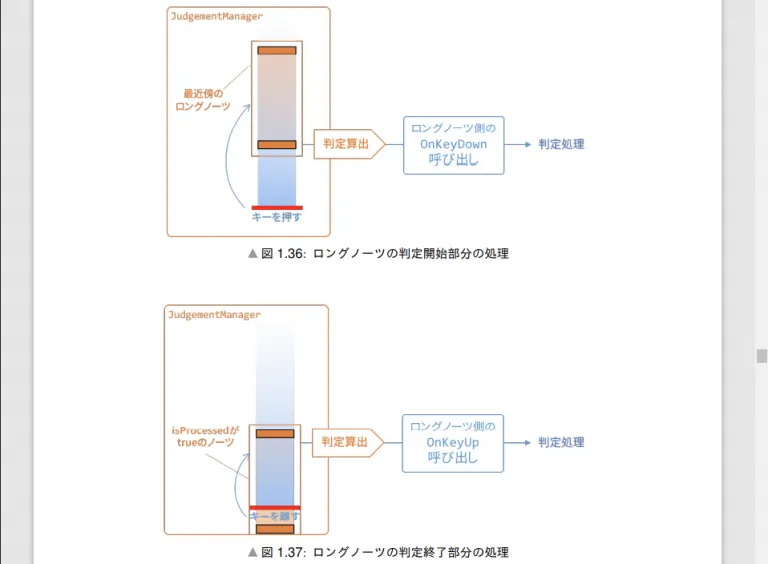
- 在LongNoteController中,除了OnKeyDown方法以外,還需要OnKeyUp方法來判斷Long Note的過程。而且需要一個字段isProcessed來作為「LongNote正在被處理途中」的表示。在起點判定成功時返回true;終點判定成功時返回false。 - 長押具體判定流程: - 判定開始部分 - 檢測鍵的按下 - 得到按下的鍵對應軌道上最接近判定線的Long Note - 計算起點的判定結果 - 調用Long Note的OnKeyDown方法 - 如果判定成功(非Miss),在Notes方面把isProcessed設為true - 判定結束部分 - 檢測鍵的抬起 - 得到抬起的鍵對應軌道上,isProcessed為true的Long Note - 計算終點的判定結果 - 調用Long Note的OnKeyUp方法 - 如果判定成功(非Miss),在Notes方面把isProcessed設為false,刪除Note - 示意圖:
-
實現Long Note的判定功能,需要對以下3個腳本進行一些修改
-
NoteControllerBase
- 增加字段isProcessed(表示Long Note當前的處理情況)以及OnKeyUp方法
public abstract class NoteControllerBase : MonoBehaviour { public NoteProperty noteProperty; public bool isProcessed = false; //LongNote正在處理中的標志 //按鍵按下的處理 public virtual void OnKeyDown(JudgementType judgementType) { } //按鍵抬起的處理 public virtual void OnKeyUp(JudgementType judgementType) { } } -
LongNoteController
-
覆寫了OnKeyDown和OnKeyUp方法來進行判定處理。在按鍵按下時(OnKeyDown),只有判定結果在Bad以內時會將isProcessed設為true;而在按鍵抬起時,OnKeyUp無論判定結果如何,都會把isProcessed設為false,把自己從生存notes列表中移除,刪除自身。
- 除此以外,OnKeyUp還描述了起點Miss時的處理,以及終點經過後依然按住按鍵的處理。
-
public class LongNoteController : NoteControllerBase { //... private void Update() { UpdatePosition(); CheckMiss(); } void UpdatePosition() { //... } void CheckMiss() { //沒有進入處理狀態的起點通過判定線且超過了BAD判定範圍(斷頭押) //移除該物體 if(!isProcessed && noteProperty.secBegin - PlayerController.currentSec < -JudgementManager.judgementWidth[JudgementType.BAD]) { PlayerController.existingNotesList.Remove(GetComponent<NoteControllerBase>()); Destroy(gameObject); } //進入了處理狀態的終點通過了判定線且超過了BAD判定範圍(Hold太久斷尾押) //移除該物體 if(isProcessed && noteProperty.secEnd - PlayerController.currentSec < -JudgementManager.judgementWidth[JudgementType.BAD]) { isProcessed = false; //重置長押標志位 PlayerController.existingNotesList.Remove(GetComponent<NoteControllerBase>()); Destroy(gameObject); } } public override void OnKeyDown(JudgementType judgementType) { Debug.Log(judgementType); //按下時,LongNote在BAD判定範圍內 if(judgementType != JudgementType.MISS) { //開始Long Note Holding isProcessed = true; } } //抬手 public override void OnKeyUp(JudgementType judgementType) { //由於LongNote的尾判只有在「isProcessed = true」(頭判判定成功後)才能被捕捉到 //因此這裡雖然沒有非Miss判定,但是在沒有按住LongNote的時候抬手也不會觸發到LongNote的OnKeyUp方法 Debug.Log(judgementType); //結束Holding,重置標志位 isProcessed = false; //移除該物體 PlayerController.existingNotesList.Remove(GetComponent<NoteControllerBase>()); Destroy(gameObject); } } -
要注意的是,雖然這裡OnKeyUp沒有進行非Miss判斷,容易誤以為如果玩家一開始就進行OnKeyUp動作,會使沒有到達判定線的LongNote被誤刪。但實際上,被調用OnKeyUp方法的note只有在其在「isProcessed」狀態下才能被捕捉到,而如果isProcessed為true,則代表該LongNote已經被按住,而按住時提早鬆開自然會Miss掉
-
-
JudgementManager
-
增加鬆開按鍵的描述,當按鍵鬆開時,調用該按鍵對應軌道上「處理中」(isProcessed)的note中的OnKeyUp方法。
-
  private void Update()
  {
      //每幀遍歷所有軌道
      for (int lane = 0; lane < InputSettings.Length; lane++)
      {
          //...
          //某軌道對應的鍵有輸入時
          if (Input.GetKeyDown(playerInput))
          {
              //...
          }
          //某軌道對應的鍵被鬆開
          else if(Input.GetKeyUp(playerInput))
          {
              //得到對應軌道上最近的一個長押尾Note
              NoteControllerBase processedNote = GetProcessedNoteControllerBaseInLane(lane);
              if (processedNote == null) { continue; }

              //得到這個尾押進入判定線與當前時間之間的差
              float noteSec = processedNote.noteProperty.secEnd;
              float diffSec = Mathf.Abs(noteSec - PlayerController.currentSec);

              //得到這個時間差的評價並讓其進行判定後處理
              processedNote.OnKeyUp(GetJudgement(diffSec));
          }
      }
  }
-
-
對於這一點,我們需要得到按鍵對應的軌道上「處理中」的NoteControllerBase,因此需要添加一個GetProcessedNoteControllerBaseInLane方法。
-
  ///
  /// 得到lane軌道上,與判定最快接觸且正在處理中的note(Long Note)
  ///
  NoteControllerBase GetProcessedNoteControllerBaseInLane(int lane)
  {
      //lane軌道上正在處理中的note
      var processedNote =
          PlayerController.existingNotesList
          .Where(note => note.noteProperty.lane == lane &&
                 note.isProcessed);

      //如果存在,返回它們當中的第一個
      if(processedNote.Any())
      {
          return processedNote
              .OrderBy(note => Mathf.Abs(note.noteProperty.beatBegin -
                                         PlayerController.currentBeat))
              .First();
      }
      else
      {
          return null;
      }
  }
-
-
-
-
Long Note Holding時的視覺處理
- 現在進入處理狀態的Long Note與一般的Long Note沒有任何區別,對玩家而言非常的不User Friendly,因此,為了標示出處理中Long Note與一般Long Note的區別,需要加一些額外處理
- 改變處理中的Long Note顏色
- 如果Long Note起點處理成功,固定起點的y坐標,示意圖如下:
- 現在進入處理狀態的Long Note與一般的Long Note沒有任何區別,對玩家而言非常的不User Friendly,因此,為了標示出處理中Long Note與一般Long Note的區別,需要加一些額外處理
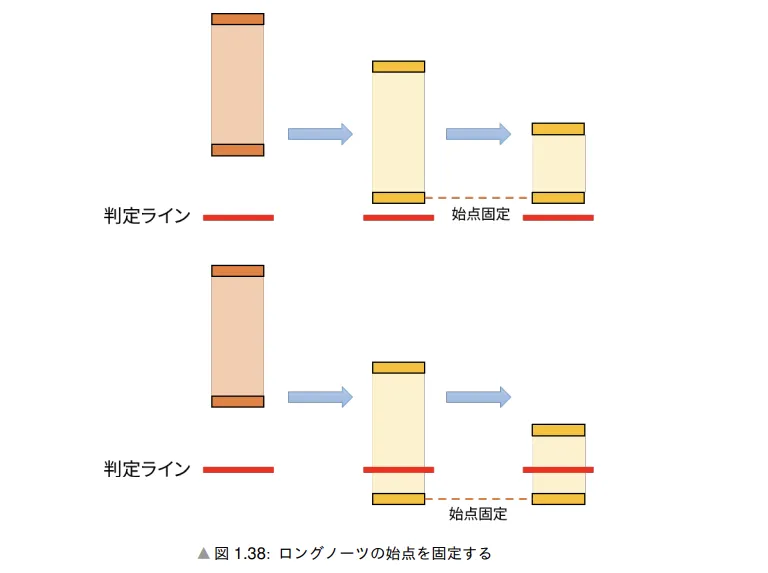
- 對於這兩個變動,雖然在LongNoteController中進行一些修改
-
添加顏色變量並在按下鍵時改變顏色
[SerializeField] Color32 processedColorEdges; //端點顏色 [SerializeField] Color32 processedColorTrail; //Trail顏色 public override void OnKeyDown(JudgementType judgementType) { Debug.Log(judgementType); //按下時,LongNote在BAD判定範圍內 if(judgementType != JudgementType.MISS) { //開始Long Note Holding isProcessed = true; //改變顏色 begin.GetComponent<SpriteRenderer>().color = processedColorEdges; end.GetComponent<SpriteRenderer>().color = processedColorEdges; mid.GetComponent<SpriteRenderer>().color = processedColorTrail; } } -
固定起點判定成功的note的起點y坐標
-
  void UpdatePosition()
  {
      //長押起點和終點拍子的坐標設置
      Vector2 beginPos = new Vector2();
      beginPos.x = noteProperty.laneXPos;
      if(isProcessed)
      {
          //固定進入處理狀態Long Note y坐標
          beginPos.y = begin.transform.position.y;
      }
      else
      {
          beginPos.y = (noteProperty.beatBegin - PlayerController.currentBeat)
              * PlayerController.scrollSpeed;
      }
      //...
  }
-
-